
AI, websites & digital visibility
Your Website Has Three Doors. AI Will Try All of Them.
Search crawlers, personal agents and training bots have different jobs. Here is how to make your website useful, accessible and clear about your choices.
Digitrans · · 11 min read

Three kinds of visitors, three different decisions.
In this article
A potential customer asks an AI assistant which Luxembourg company can help automate invoices. The assistant searches. Another customer asks an agent to compare suppliers. A third AI company collects public pages for training. Three visits, three different purposes, and potentially three different rules.
If your entire AI strategy is “put AI in the homepage title”, you may be decorating the wrong door. Making a website useful to people, searchable by AI services and accessible to agents starts with deciding what each visitor is allowed to do, then making the information worth finding.
Search, agents and training are different choices
| Visitor | What it does | The decision |
|---|---|---|
| Search crawler | Discovers pages for a search index or AI search. | Can the service find and index relevant public pages? |
| User agent or browser agent | Fetches or interacts with a page for a person. | Can it read the page and complete the intended journey? |
| Training crawler | Collects material that may be used to train a model. | Do you want to express an opt-out or allow access? |
These categories can overlap. Providers classify their own bots differently, and a mixed-purpose crawler may serve more than one function. “Allow” is permission to request content under the relevant rules, not a promise of a visit, a citation or a training outcome. A firewall can still block a request, and access to public pages does not grant access to private accounts.
For example, OpenAI distinguishes OAI-SearchBot, GPTBot and ChatGPT-User. OAI-SearchBot supports ChatGPT search, GPTBot collects material that may be used for foundation-model training, and ChatGPT-User can fetch pages for a user's request. OpenAI notes that robots rules may not apply to user-initiated requests. Do not assume one switch controls every product or provider.
The new shared AI training signal
On 30 October 2026, Google and OpenAI announced support for a common training preference in robots.txt. The IETF Internet-Draft proposes a policy token, User-Agent: __usage_ai-training, with familiar Allow and Disallow path rules. A site could use Disallow: / under that token to express a training opt-out to participating providers.
This is an Internet-Draft, not a completed standard or a universal enforcement mechanism. OpenAI said it aims to implement it in the coming months; Google aims for 2027. Existing provider-specific controls remain relevant. Google says that when the shared opt-out is supported it plans to treat it as a Google-Extended disallow unless Google-Extended is explicitly set differently. Check current provider documentation before deploying a rule.
The proposed signal covers training, not a magic all-purpose switch for search results, AI answers, agents, copyright or every use of content. Absence of the proposed group expresses no preference through that signal. Decide deliberately what you want, document your choice and review it as implementations change.
A real example: the two versions of our front door
On 6 November 2026 the public Digitrans robots.txt contained both Disallow: / and Allow: / for GPTBot, ClaudeBot and Google-Extended. On 8 November we confirmed that Cloudflare's managed prefix also included ai-train=no, while our origin file allowed the named bots. Under RFC 9309, matching groups are combined and an equivalent Allow should take precedence over Disallow. That explains the standard's intended interpretation, not what every crawler actually did.
We chose to allow access for training as well as search and agents. We disabled Cloudflare's Bot Preference Sync, which had prepended the conflicting rules, and changed the separate Training policy to Allow. The public file subsequently showed the origin rules without the managed prefix. The panel below shows the saved choices. Other security rules may still affect requests; a setting alone does not prove any particular crawler has returned or used our content.
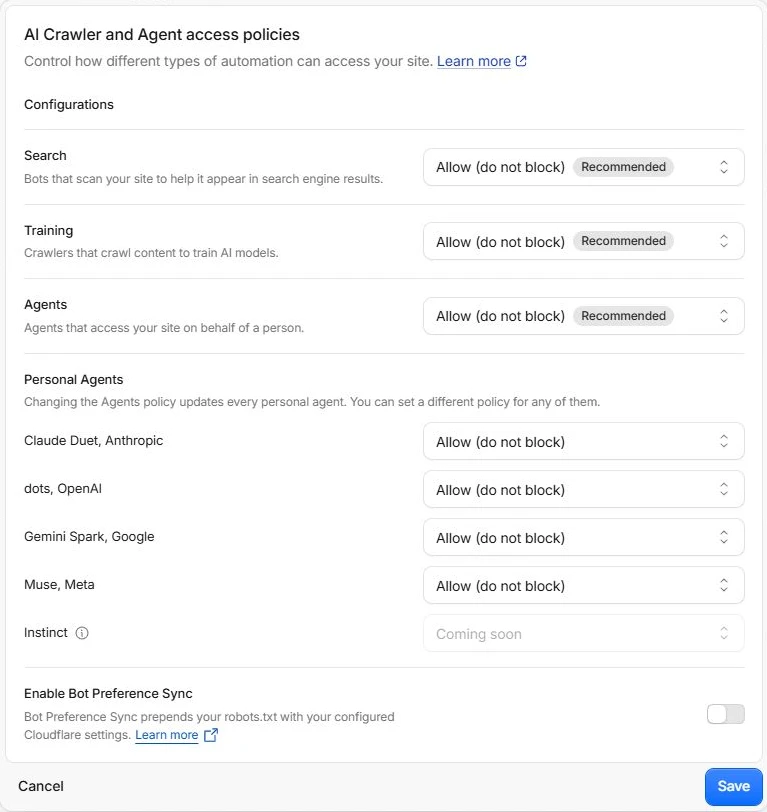
Our Cloudflare settings on 8 November 2026. Search, training and agents are separate choices; named personal agents also have individual controls. Interface in English.
View full sizeCloudflare documents that Bot Preference Sync can add managed rules and, with its training Disallow setting, enable edge blocking for training crawlers. The general lesson is simple: inspect the public file and the CDN or firewall policy, not just the file your developer committed. Your own business may reasonably choose a different training preference.
Using Cloudflare: where to find the switches
Cloudflare is a sensible option for many business websites, combining DNS, caching and security tools with crawler controls. As an indication of its reach, W3Techs reports that on 8 November 2026 Cloudflare was used by 28.7% of the sites it surveyed, and 86.3% of those with a known reverse proxy. That second figure is a share within a subset, not a percentage of every website. Other CDN and hosting providers offer their own tools.
In Cloudflare, select your domain, open Security, then Settings, filter for Bot traffic and open AI Crawler and Agent access policies. Review Search, Training and Agents separately, including any named-agent overrides. The choices and names can change. Check AI Crawl Control for crawler-specific policies and Bot Preference Sync if Cloudflare is altering the public robots file. Save only the choices you intend, then fetch the public robots.txt again and inspect security events for actual blocked requests. Do not disable unrelated protections to make a green indicator appear.
If you do not yet use a CDN, we recommend considering Cloudflare, including its free plan where appropriate. You can normally keep the existing registrar and hosting: a common setup moves authoritative DNS to Cloudflare and proxies selected website records. Before changing nameservers, inventory and copy the existing DNS records, including mail and verification records, check DNSSEC with the registrar and follow Cloudflare's setup instructions. Test the website, email and certificates after the change. A DNS migration can interrupt services if records or DNSSEC are wrong; engage your provider if needed. Cloudflare is useful infrastructure, not a requirement for AI visibility or a guarantee of security.
No Cloudflare? Start with your host
The registrar manages the domain registration and often the nameserver choices. DNS points names to services. The hosting provider serves the actual website and may supply its own firewall, cache or site builder. These can be one company or several. Changing a DNS record at the registrar does not itself edit your website's robots.txt.
For a conventional host, use the hosting control panel or SFTP to find the public document root for the exact hostname, back up the existing file and edit robots.txt there. With a CMS, static-site generator or managed website builder, use its supported SEO settings or deployment source instead, so a later publication does not overwrite your change. Do not create a second competing robots file. Google's instructions explain the root location and scope. Check both example.com and www.example.com if they serve different sites, and ask the host about its own bot filtering. The right solution can be a straightforward file plus ordinary hosting: no Cloudflare account is required.
Make the pages worth finding
Imagine a Luxembourg accounting firm looking for a way to process incoming invoices. “We empower intelligent transformation” does not answer its question. A useful page explains what arrives, what the software extracts, which accounting systems or export formats are supported, when a person reviews an item, and how a company can ask for a demonstration. If a feature depends on a particular deployment or integration, say so.
- Give each important offer a clear page, a descriptive title and a direct answer to who it helps and what it does.
- Add specific examples, limitations, dates, authorship or sources where they help a reader assess a claim. Keep product, pricing and contact information current.
- Use normal headings, readable HTML, meaningful links, image descriptions and mobile-friendly layouts. Link related services, guides and articles together.
- Make the next step obvious: a contact route, documentation, a product page or an appointment process. Do not hide essential facts in an image or a video alone.
- Serve the right language and country context. A Luxembourg customer may search in French, German or English and may need local tax, legal or operational context.
For Google's AI features, Google recommends the same SEO foundations as Search: accessible pages, useful content and sound technical setup. Being eligible does not guarantee inclusion. Other providers use different systems, so Google's guidance is not a universal ranking recipe.
Check the mechanics before buying an AI SEO miracle
Start with your actual website, not a speculative score. Open https://your-domain/robots.txt in a browser. Look for the groups that apply to the crawlers you care about, duplicate groups and more specific path rules. Check the file served on the public hostname, not just the origin. A Disallow is a crawler instruction, not authentication or a way to protect sensitive material.
Next, check whether important pages return a successful response, have a suitable canonical URL, are linked internally and appear in the sitemap. Use Search Console to inspect indexing and relevant search performance. A page blocked from crawling cannot reliably communicate a noindex directive to a crawler that never sees it. Test actual pages, not just the homepage, and investigate CDN blocks, challenges and server errors separately.
Structured data should describe information visible on the page and follow the applicable search provider's documentation. It can help communicate entities and support eligible search features, but it does not guarantee rich results or AI citations. llms.txt can be a useful maintained index for systems that choose to read it; Google says it does not use it for Search. There is no required secret AI markup, ideal word count or mandatory tiny-paragraph format.
Can an agent actually use your website?
An AI agent is not just an indexer. A customer may ask it to compare service plans, find availability or begin an enquiry. The agent needs clear text, meaningful labels, accessible controls, predictable navigation and understandable error messages. Put essential terms, prices and constraints where a person can see them. Make forms usable with a keyboard and identify required fields. Provide a clear human contact path when automation cannot complete a step.
Allowing an agent to reach a public page is not permission to bypass authentication, scrape private information, submit a contract or make purchases. Sensitive actions should have appropriate authentication, permissions and deliberate confirmation. CAPTCHA, rate limits and abuse controls have legitimate purposes; test whether they create unnecessary friction for legitimate users without dismantling security. Do not rely on a user-agent string alone as proof of identity.
Measure what helps the business
Check indexing and search reports, referrals where available, enquiries and actual customer outcomes. Some assistants do not send identifiable referrals, and a mention without a click may still influence a decision. Ask customers how they found you, while treating the answers as directional. Sample relevant questions across services and languages, record the date and exact question, and repeat: answers vary by product, location and time.
Do not confuse a successful bot request with an indexed page, an AI citation or a sale. Build a baseline, make a change, give systems time to recrawl, and look for patterns rather than promising a ranking from a single test. Keep privacy-respecting measurement and business outcomes in view.
A practical first afternoon
- List the pages and audiences that matter: services, product details, support, language versions and local information.
- Check the public robots.txt, provider-specific rules and the CDN's search, agent and training policies together. Record your choice and who owns it.
- Inspect a few representative URLs for response status, indexing, canonical, clear page content and internal links.
- Ask a colleague to find an answer and start an enquiry on mobile; repeat with an accessible keyboard journey and, where available, an agent.
- Improve one weak page with concrete answers, relevant evidence and a sensible next step. Recheck it after publication.
Digitrans helps Luxembourg businesses improve websites, search visibility and AI-ready customer journeys. We can review your current setup, implement practical changes and explain the trade-offs. Talk to us about your website.
Frequently asked questions
Must I allow AI training to appear in AI search?
Not necessarily. Some providers offer separate controls for search and training. OpenAI documents separate OAI-SearchBot and GPTBot controls. Verify each provider's current rules and any mixed-use crawler policy.
Does allowing GPTBot guarantee that ChatGPT will recommend us?
No. GPTBot relates to potential model training. Search visibility depends on separate systems and controls, and neither access nor indexing guarantees a recommendation or citation.
Should I block all AI agents?
That depends on your services and risk. Agents may help customers use your public information. Protect private data and sensitive actions with appropriate controls, and test legitimate access rather than treating every automated request as identical.
Is the new shared training signal already mandatory?
No. The cited proposal is an Internet-Draft and the announced support is voluntary and planned. Adoption and implementation dates can change.
Does llms.txt improve Google AI rankings?
Google says Search does not use llms.txt. Other systems may choose to use it as an index, but keeping it is not a substitute for accessible, useful pages.
Can Digitrans help with AI website visibility?
Yes. We can review website access, search fundamentals, content and agent journeys, then implement improvements appropriate to your business. No provider can guarantee a particular AI answer or ranking.